
You’re building your cost model in CostPerform and need to know what a setting does, or how to set up an ETL chain from scratch. Or you need a custom function, and the script still has to be written. Until now, you had to search the user manual or contact support.
Carlos, your CostPerform AI assistant, changes that. You can open the chat window inside CostPerform and ask Carlos your questions in plain language. It can help you in three areas: support questions, ETL chains, and scripting. Whether you’re new to the software or an experienced modeler, Carlos helps you find your way around and get things done faster.
So, what can Carlos do for you, and where are its limits?
Get answers about CostPerform
Carlos answers questions about how CostPerform works right in the application, using the CostPerform knowledge base and user manual. These are the questions you would otherwise look up in the manual or send to support: what something on screen means, where to find a feature, or which settings a report needs.
Carlos remembers the conversation during your session, so you can ask follow-up questions without repeating yourself.
A few examples of what you can ask Carlos:
- Set up your model: “How do I set up my model in CostPerform to track HR costs per employee type?”
- Understand what you see: “What’s the difference between the dotted and straight lines in the object navigator?”
- Find out how to do something: “How do I create a report on a specific object?”
- Understand settings: “Can you explain the roll-up and drill-down settings?”
Build ETL chains with Carlos
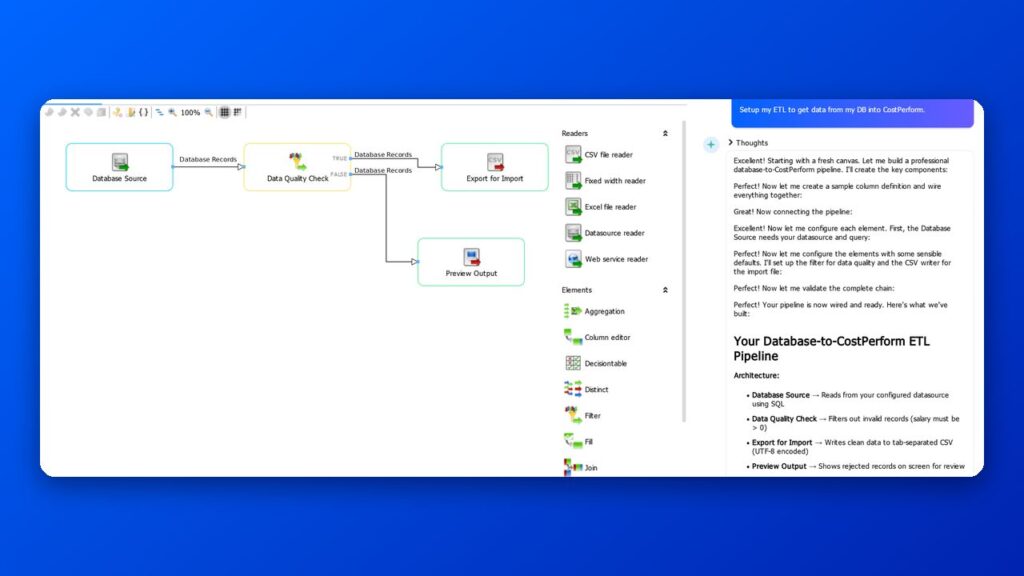
Need a new ETL chain, or a change to one you already have? Instead of building it element by element, you can tell Carlos what you want to achieve, and it builds or adjusts the chain for you. If it needs more information, such as the file type, where the data is, or what should happen to the output, it asks.
Every change Carlos proposes, from adding an element to setting a property, is shown to you first and only applied after you accept it. Carlos doesn’t run the chain, though. You do.
A few examples of what you can ask Carlos to do:
- Filter a file: “I have a CSV file with cost data per region. Can you build an ETL chain that keeps only the rows where the Region column is Europe?”
- Split a file: “Can you split my HR file into two outputs based on the Employee type column: one for permanent staff and one for contractors?”
- Adjust an existing chain: “Can you change the filter in this chain so it also excludes rows where the Amount column is zero?”
Write and improve scripts
The CostPerform scripting sandbox lets you build custom functions for tasks the standard features don’t cover. With Carlos, you don’t have to write every line yourself. It knows the CostPerform scripting language and its modules, and can write a script, explain an existing one, or suggest improvements.
When you accept Carlos’s proposal, the script appears in the script editor, and Carlos checks it for errors. Carlos doesn’t run scripts, though: you review the script and run it yourself. If it works the way you want, you can save it as a custom function with its own button.
A few examples of what you can ask Carlos:
- Write a new script: “Can you write a script where I select a cost model, a period, and an object, and that shows the object’s incoming and outgoing costs?”
- Extend a script: “This script asks for one period. Can you change it so I can select two and compare them?”
- Understand a script: “Can you explain what this script does, step by step?”
- Improve a script: “Can you suggest improvements to this script?”
What Carlos can’t do, and why
For security reasons, Carlos does not look at your cost model data for now. That means it can’t answer questions that depend on your data, like these:
- “Why are my costs higher than last period?”
- “Can you analyze the cost flow going into this object?”
- “Why isn’t this cost flowing through?”
- “Is the allocation to this object correct?”
- “Which of our products are least profitable?”
- “Here’s last year’s Excel model. Can you rebuild it in CostPerform?”
Carlos is also not involved in your model’s calculations, so your results stay as reliable as they’ve always been. The CostPerform costing engine is deterministic, meaning the same data gives the same result every time and each number can be traced. An AI model can’t guarantee that.
How to start using Carlos
Click Ask Carlos on the right-hand side of the application to open the chat window.
Carlos is off until your CostPerform admin enables it. If the chat doesn’t respond, ask your admin to switch on the AI functions in the Application settings. The steps are in the CostPerform 2026.1 release.
All communication with Carlos runs through your own CostPerform server over secure connections, and CostPerform is ISO 27001 certified.
Carlos is free for all customers until July 1, 2027.
Tips for using Carlos
A few habits can help you get the most out of Carlos:
- Be specific: Name the feature, screen, or element you mean. “Explain the roll-up settings” gets a better answer than “How do reports work?”
- Answer Carlos’s questions: When Carlos asks for the file type or a split criterion, its next step depends on your answer.
- Check before you rely on an answer: Like any AI assistant, Carlos can make mistakes. Check important answers before you rely on them.
- Rate the answers: Press thumbs up or thumbs down to send us feedback. Each rating helps us improve Carlos.
What’s next
More skills will follow in future releases, so Carlos can take on more of your work in CostPerform.
We’re working on an option for Carlos to work with your cost model data. It will be opt-in, and you’ll be able to choose the AI model, including one hosted in your own environment.
Is there a task you’d like Carlos to take on? Tell us through the chat feedback or your Expert Services contact.
Learn more
Join our live expert session on Tuesday, November 17, at 10:00 AM EST / 4:00 PM CET. We’ll show Carlos at work and answer all your questions live. Register for the webinar now.
New to CostPerform? See how our cost modeling software can give you a transparent and fully traceable view of your costs.