Cost Modeling Software
Cost modeling software that shows you the why behind every cost.
What is Cost Modeling Software?
Cost modeling software helps organizations build and maintain a cost model. It maps how resources connect to the activities they support, and how those activities connect to the products, services, clients or transactions that consume them. The model is based on cause and effect and shows why a cost is what it is.
You can do this in a spreadsheet, but you’ll be rebuilding formulas by hand every time something changes. Cost modeling software gives you one model instead. Change a cost driver, an activity, or a volume, and the model recalculates the whole picture (unit costs, margins, and profitability) within minutes.
Why you need Cost Modeling Software
Spreadsheets are calculators, not costing tools. Excel is fine for a quick business case but running your full financial data through it every month is a different matter.
- Scale without losing control: A spreadsheet model holds up at around 10,000 rows, 20 columns and 30 sheets. Push it to 50 sheets, a thousand columns and a million rows and Excel will stop coping. Cost modeling software is built for that scale from the start.
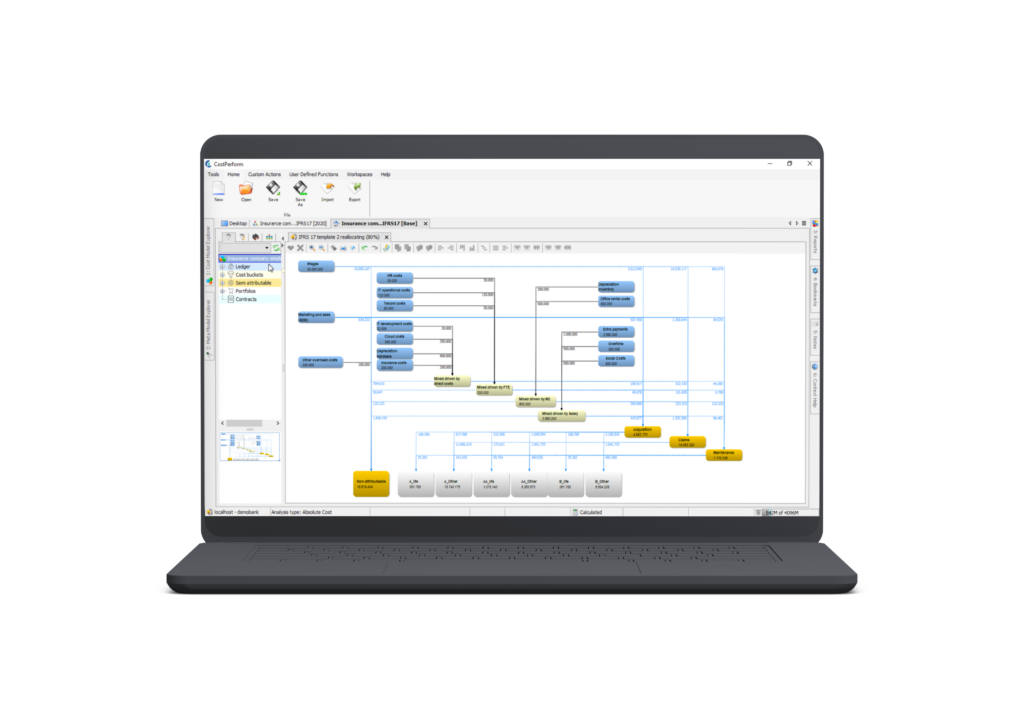
- Trace any cost back to its source: In a spreadsheet, the logic lives inside the cells, so tracing where a cost came from means reading formulas backwards, sheet by sheet. Cost modeling software shows you the flow visually, from the general ledger through to the product that consumed it.
- Change the model without breaking it: In a spreadsheet, everything is connected and nothing is visible. Add a column or change a formula, and something might break three sheets away. That makes spreadsheet models easy to get wrong and hard to hand over.
- Everyone works in the same model: Spreadsheets get copied, emailed and edited in parallel. With software, there is one model and one version of it.
Then there is the process around the model. In a spreadsheet, most of the time goes into getting data out of your source systems, into the model, and back out again, because most of that is manual work. With cost modeling software you set the data flow up once and schedule it. After that, new data comes in and the model runs on its own, as often as you need it to.
Why CostPerform?
-
Built for finance teams
Some tools need technical knowledge, or knowledge of a specific ERP. CostPerform is built for people who have worked in finance their whole career. -
Model any cost allocation method
If it is a cost allocation, CostPerform can model it. Our predefined methods and industry templates give you a starting point. -
Made for complex and non-standard organizations
Fixed models assume every organization in an industry looks the same. When yours doesn't, or when the structure is genuinely complex, CostPerform still fits. -
Unrivaled expertise in cost allocations
CostPerform has 25 years experience in implementing cost allocation solutions, with experienced consultants based in the US and Europe. -
Extensive training and support
We provide dedicated training through our CostPerform Academy, while our partners guide you seamlessly through the implementation.


Trusted by finance leaders worldwide:

"The user-friendliness of CostPerform allows us to run saved calculations. It's fast. Lets the team focus more on value-added activities. It has provided greater transparency on our cost stacks which in turn has helped us better understand our cost base."
– British Telecom
Most Important Cost Modeling Tool Features

Create true cause-and-effect relationships between products and costs

Visualize how costs flow through your organization and trace them back to the source

Model cost structures of any size and complexity

Simulate scenarios before you commit to a decision
How CostPerform's Cost Modeling Software works
CostPerform’s software is built to give you insight into the cost and performance of your business.
- Model your costs your way: There are no forced structures. Build a cost model that reflects how your organization actually works and adapt it as your needs change.
- Full traceability: With CostPerform every allocation can be explained without black boxes. You can roll up costs to their origin in the general ledger, or drill down from a cost centre to the individual products or transactions it feeds, to see exactly where costs are flowing and why.
- Validate your model automatically: The built-in Model Validation tool scans for 10 types of problems, from mismatched incoming and outgoing costs to illegal allocations and invalid formulas, so you catch issues before they reach reports.
- Plan ahead with What-If analysis: Test different scenarios such as a volume change, a new market, or a resource cut, and see the financial impact before you commit to a decision.
- Connect to your data wherever it lives: CostPerform’s ETL brings your financial and operational data in, ready for modeling, and pushes results back out on a schedule.
- Spot your feeders and bleeders: Use tools like CostPerform’s whale chart to instantly see which products, customers, or channels are most and least profitable, then roll up and drill down into the underlying cost drivers to understand why.
Over 200+ finance leaders worldwide trust CostPerform to keep their cost models accurate, explainable, and easy to maintain without adding technical complexity or IT dependency.
Cost allocation methods supported by CostPerform’s software
CostPerform is designed to serve any cost allocation method, so you are not stuck bending your business to fit a vendor’s template. You don’t have to build one from scratch either. Predefined methods and industry templates are already available for your sector, so you can start straight away and benefit from experience already gained in your domain.
- Activity-based costing (ABC): assign costs to products and services based on the activities they actually use. This way, overhead costs stop distorting your margins. More on CostPerform’s ABC solution.
- Time-driven activity-based costing (TDABC): use time as the cost driver, so costs follow real volumes and unused capacity becomes visible. See how TDABC works in CostPerform.
- Multi-dimensional costing (MDC): allocate costs across product, country, client and sales channel at once, and see which markets or channels are quietly subsidizing others.
- Direct costing and rate-based ABC are available as predefined methods too.
Whichever cost allocation method you use, CostPerform cost modeling software can handle it.
Proven in the field: cost modeling at the National Bank of Belgium
When the National Bank of Belgium needed to replace an existing cost model built in Oracle HPCM, CostPerform blended an off-the-shelf setup with the bank’s own requirements. The rebuilt cost model ran 10 times faster, with roll-up reporting that made cost transparency simple, all while meeting the bank’s strict European Central Bank reporting deadlines.
Cost Modeling Software Use Cases
Here are some of the ways finance teams use CostPerform’s cost modeling software.
Product / Customer Profitability
Calculate what you actually earn on a product, a customer, or a specific product sold to a specific customer. CostPerform identifies value leakage across products, services and segments and shows the true cost to serve, so you can price and prioritize accordingly.
Service Costing and Cost Transparency
Calculate what it costs to deliver a service, accurate to the cent. Government agencies use CostPerform to cost a passport application, a visa or a tax assessment, and banks use it for the services behind an account. Once you know the real cost of a service, you can set a price for it and explain that price to anyone who asks.
Internal Service Costing
Cost the services one department delivers to another. This comes up most often in IT, where a laptop, storage or a hosted application needs a defensible unit price before it can be charged or shown back to the business units. The same approach applies to HR and other shared services.
Budgeting and Forecasting
Integrate CostPerform into your existing budgeting and forecasting processes for a more accurate financial outlook. Because your budget sits on a cost model built on actual cost drivers, a change in volume works through to a change in budget, and you can see what something will cost before you commit to it.
Other cost modeling use cases
Finance teams also use CostPerform for other cases, including long-run asset costing and for benchmarking their cost structure against comparable organizations. Whatever you need to cost, we are ready to support your requirements.
Hear it from Central Garden & Pet
Russell Vannoy, Senior Manager of Business Performance, shares how a 6,000+ employee organization models costs across business units and stays flexible when scenarios shift, seasonality peaks, and deadlines approach.
FAQs about cost modeling
How do you create a cost model?
Start by identifying your cost objects, the products, services, clients or activities whose cost you want to understand. Then identify your resources, meaning what you actually spend money on: people, systems, facilities. Map the cause-and-effect relationships between them, so you know which resources drive which activities, and which activities drive which cost objects. Cost modeling software structures this process and automates the calculation as the model grows.
Why use CostPerform’s software instead of another vendor?
Cost allocation is what CostPerform does. Budgeting tools and ERP modules are built for something else, and industry-specific tools come with a fixed model you have to fit into. CostPerform is the stronger choice when your cost structure is complex, when your organization doesn’t match a standard template, or when you need to explain every number to a regulator.
Why not just use the costing module in our ERP?
It seems simpler to keep everything in one system, but the advantage is smaller than it looks. Even inside your ERP, costing data usually has to come out of another database first. You may as well run CostPerform on top of your ERP and get cost modelling software that was actually built for costing.
Can CostPerform connect to our systems?
As long as your data sits in an accessible database, yes. CostPerform’s ETL pulls data in from any accessible source and can push results back out the same way, and the flow can be automated on a schedule.
What is the difference between cost modeling and cost estimating?
Cost estimating is a one-off calculation of what something will cost, usually for a new product, project or service, while cost modeling builds a reusable structure that keeps answering that question as the business changes. An estimate gives you a number and a model shows you why.