
We’re releasing CostPerform 2026.1. It introduces Carlos, a built-in AI assistant that answers your questions about CostPerform, builds ETL chains with you, and helps you write scripts. The release also brings a more efficient Insights engine and improvements to ETL, administration, and security, plus 28 bug fixes.
Meet Carlos, your new AI assistant
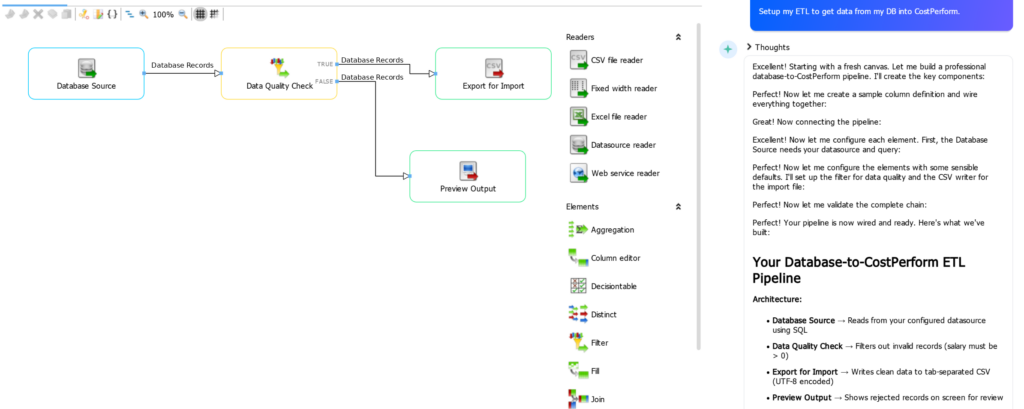
Carlos builds a complete ETL chain from a single request, including a data quality check and a preview of rejected records.
“The best software doesn’t just give you tools. It helps you use them. Meet Carlos.” — Bert-Jan de Gier, CTO of CostPerform
Click on Ask Carlos and ask your questions directly in the chat window.
- Get answers about CostPerform: Carlos answers using the CostPerform knowledge base and user manual, so you get help without leaving the application.
- Build ETL chains together with Carlos: describe what you want to achieve and Carlos builds or adjusts the ETL chain for you. You stay in control: every change Carlos proposes is shown to you first and is only applied after you accept it.
- Scripting: Carlos knows the CostPerform scripting language and its modules. Ask Carlos to write a script, explain an existing one, or suggest improvements. You review the script and run it yourself.
- What Carlos doesn’t do: Carlos does not look at your cost model data, so it can’t analyze your costs or explain results in your model. More skills will follow in future releases.
- Security: all communication with Carlos runs through your own CostPerform server over secure connections, and Carlos never changes your ETL without your approval.
- Feedback: press thumbs up or thumbs down on an answer to automatically send us your feedback and help us improve Carlos.
- Pricing: Carlos is free for all customers until July 1, 2027.
How to enable Carlos
An admin needs to enable Carlos first. After the update, all users see the Ask Carlos button, but the chat only works once the AI functions are enabled.
Steps for the CostPerform admin:
- Open the Application settings
- Enable the AI functions
- Accept the AI Functionality Terms on behalf of the organization
This works the same way for SaaS and on-premises installations. On-premises installations need an internet connection for Carlos to work.
Insights
Insights has been upgraded to a new, more efficient engine that starts only when you use Insights and now supports Windows Authentication and encrypted connections to SQL Server. Highlights:
- Hover tooltips with actions: tooltips appear on hover for every visualization that supports them, and you can drill down or filter directly from the tooltip.
- Smarter conditional formatting: apply formatting based on field values in Grid, Pivot, Bar, Column and Text visualizations, including comparing a field against another field in the same visualization.
- New data grid: select cells, drag-select multiple cells, and copy values to the clipboard with Ctrl+C in a refreshed design.
- Refreshed gauges: linear gauge, radial gauge, and bullet graph visualizations have an updated look.
- Easier editing: a draggable splitter in the visualization editor lets you resize the chart and data areas.
- Updated date filter: a cleaner date filter.
- Full keyboard navigation: improved accessibility for Pivot, Grid and Sparkline, plus full keyboard support in Edit Mode.
ETL and data
- Import multiple files in one go: the CSV, fixed width, and Excel file readers now support wildcards in the file name.
- .csv and .tsv files are now shown directly when you browse for text files.
- When filling in a variable of an ETL chain or ETL task, you can now also browse to a file or folder instead of typing the path yourself.
- When attributes are shown as Symbol [Name] or Name [Symbol], new data warehouse exports no longer contain square brackets, so the data is easier to use in Insights.
Platform and administration
- Configuration settings are backed up automatically during an update
- The SAML relay domain can be overridden
- When multiple roles match via SAML claims, the least privileged role is applied
- Updated components and libraries
Security
Security is an ongoing priority for us. As part of our regular security program, including independent penetration testing, this release brings the following improvements:
- Strengthened protection of server components on on-premises installations
- Strengthened isolation of the scripting environment
- Improved protection against repeated login attempts
- Error messages now show less technical detail
- Stricter validation of incoming request headers
- Tightened cross-origin (CORS) policy
We have released a security patch version, 2026.1.1, that fixes three vulnerabilities that were disclosed recently. Please see the readme for more information on what was patched.
Bug fixes
ETL designer
- Decision table could fail with specific strings
- The full action is now visible in the decision table ETL
- File validation improved
- Variables inside a REGEX element no longer throw warnings
- ETL validation is triggered on duplicate names
- Fixed a typo in the Lookup tooltip
- DatasourceWriter no longer shows an output connection point
- The Running ETL Chain dialog shows the rows written to the datasource
- Closing an ETL with the X icon closes the correct ETL when two are open
- Progress indication improved
- Better memory management on SaaS for accumulating Big Data imports and ETL chains
- Automatic retry when saving results fails due to incompatible changes to the cost model
Data sources
- The SSL toggle on a data source is saved
- SSL connections to MySQL improved
- Loading plug-ins and database drivers failed when connected to SaaS through a VPN
- Creating a data source no longer fails when one with the same name is hidden by permissions
- Negative number format is set consistently for MySQL DOUBLE fields, as for Oracle numeric fields
Calculation and Big Data
- Residue allocation volume is added consistently to Total Usage for loop and non-loop objects
- Drilldown sometimes returned an incorrect number in specific situations with objects that have inter-layer loops
- Pipe characters in names or symbols caused Big Data rollups to fail
- Start objects were not filled correctly in the rollup settings when performing a rollup from the Big Data pivot
- Feedback is shown when a conditional driver is invalid
Portal Insights
- Data sources using Windows Authentication on SQL Server work correctly in the Portal
- Visualizations load reliably without credential errors
- The Data warehouse button didn’t work in specific cases
- The folder structure in Publications could be unreadable
Installation and administration
- Backups work for databases with very large rollup/drilldown settings
- User Logging shows the correct date and logs manual group assignments
Want to learn more?
Join our live expert session on Tuesday, November 17, to help your team get the most out of Carlos. We’ll show Carlos in action and answer your questions live.